Skip to content

Online digital microscopes for science education

The problem-free microscope,
in every student's hands.

StudyScope turns a shared link into a perfect microscope. Browse a catalog of gigapixel slides, build guided lessons, and explore them together in real time — no broken or lost slides, no broken microscopes, no out-of-focus images, no lost teaching time.

Cancel anytime · Students join without an account ·

Gigapixel
Deep-zoom detail
Perfect focus
All of the time
No accounts
For students, ever
Focusing…
AgaricusMushroom Gills (Cross Section) · Safranin · 20×

The instrument

The perfect microscope, in the browser

StudyScope is an online digital microscope built for science teachers. Access a full catalog of gigapixel slides, a projector, and guided lessons without the hassle of physical microscopes — now a link away, on any device. StudyScope's capabilities include:

  • 01

    Gigapixel slide catalog

    Professionally prepared specimens, scanned at full resolution and catalogued with stain, magnification, and searchable tags.

  • 02

    True deep zoom

    Pan and zoom from the whole specimen down to single cells, always in focus — tuned to stay smooth on school networks and Chromebooks.

  • 03

    Your own library

    Save the slides you teach with, sort them into folders and collections, and keep planning notes attached to each one.

  • 04

    Guided lessons

    Group slides into ordered lessons and walk through them with students step by step, with private notes only you can see.

  • 05

    Present live

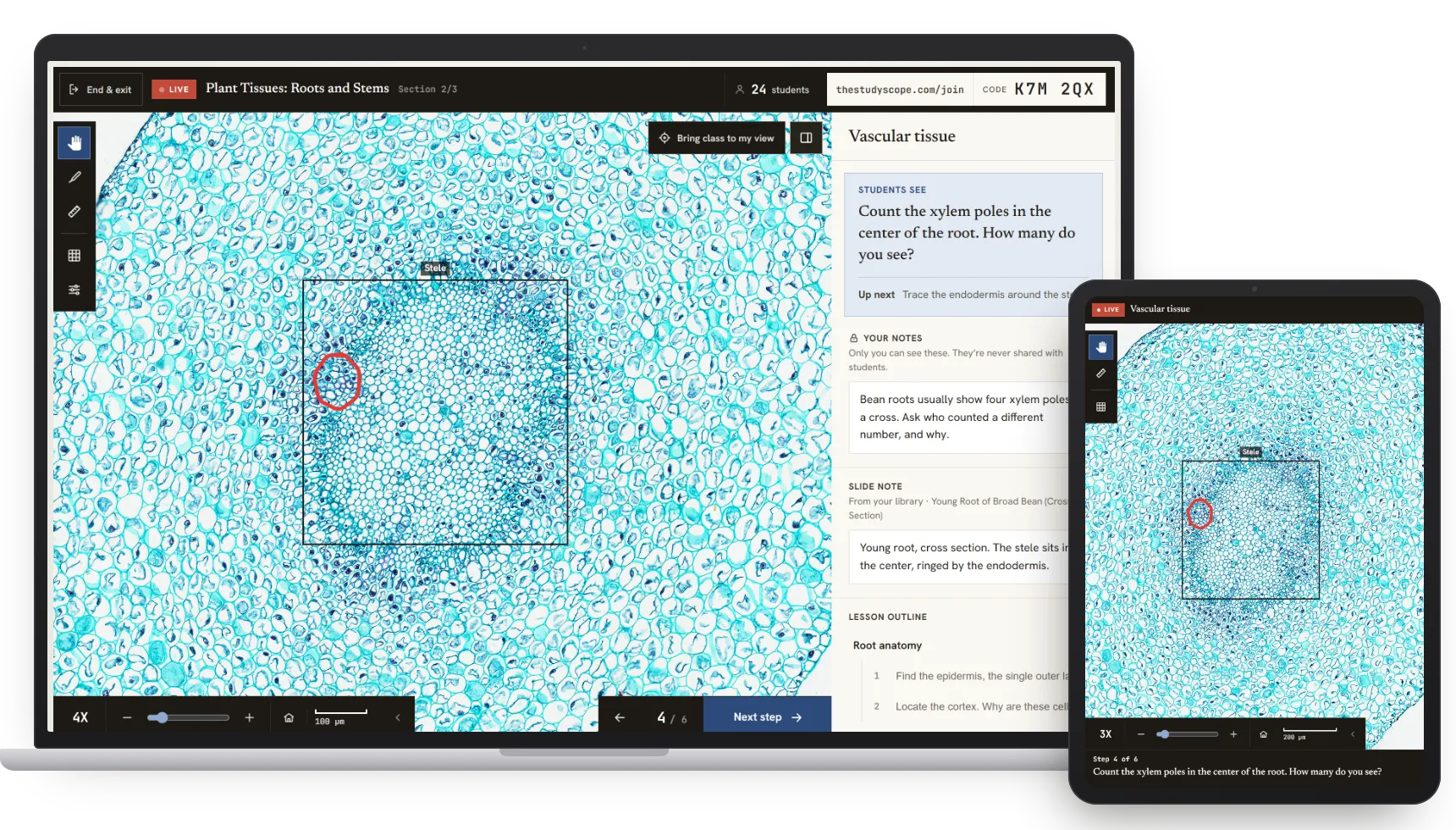
    Start a session and students join with a room code. They see the slide and step you are on, and one tap jumps them to exactly your view.

  • 06

    Annotate as you teach

    Mark up images that stay anchored to the image at any zoom — students see them appear as you draw

  • 07

    No student accounts

    Students join by room code or a shared link, in any browser on any device. Nothing to install, and no student personal data collected.

  • 08

    Measure in real units

    Measure structures in microns and millimetres, calibrated from each slide's own scanner data, with a true-magnification readout and grid overlays.

The workflow

How teachers use StudyScope

Four steps from an empty screen to the class exploring images.

  1. Step 1

    Find a specimen

    Search the catalog by subject, specimen, or tag and open any slide in the deep-zoom viewer.

  2. Step 2

    Build the lesson

    Group slides into sections, then add a step for each item a student should note or do — plus private notes only you see.

  3. Step 3

    Share or present live

    Share slide links for class use or homework, or start a live session — students join instantly from their own devices with a room code.

  4. Step 4

    Explore science

    Students can work independently or follow your view and instructions — draw on the specimen, then jump everyone to your exact view with one tap.

Live lessons

The entire class, on the same perfect image

Start a live session and the entire class follows along with you. Draw on the specimen and your markings show up on their screens as you make them. Bring every student to your exact view with one tap. They join in seconds with a room code, from a phone, tablet, or the machine in front of them — no apps, no logins for students, ever.

  • Jump the class to your exact view, one tap
  • Annotations appear as you draw them
  • Late joiners catch up on what you drew
  • Join by room code — nothing to install
  • Works on any classroom device
Get started
LIVE Zea root tip — L.S.
Room codeBR7K
24 students in the room

Pricing

One plan. Everything included.

No tiers to compare and no features held back — every seat gets the whole instrument.

per teacher

The price per seat doesn't change, whether it's one teacher or the whole district.

The students you teach are always free. No accounts, no extra charges.

StudyScope is for

  • Teachers
  • Homeschool parents
  • College students
  • Researchers
  • Principals
  • School administrators
  • Whole districts

One teacher

A single seat, set up in a couple of minutes.

  • The full deep-zoom slide catalog
  • Students have access 24/7
  • Save slides to your own library
  • Build step-by-step lessons
  • Present live — students join with a code
  • Freehand annotation as you teach
Subscribe

Cancel anytime · Secure checkout by Stripe

School or district

Seats for your staff, bought and renewed together.

  • Everything a single seat includes, for everyone
  • One workspace for your whole team
  • Per-seat invite codes to hand out
  • Add or remove seats as staff change
  • One invoice, one renewal date
Get seats for a team

Purchase orders and quotes welcome — talk to us

Already have an activation key or invite code from your school? Redeem it here — no card needed.

Get notified

New slides added to the catalog, new lessons, and a classroom-ready way to use them — a short note, about once a month. Unsubscribe anytime.